Daily Word Challenge
- 4.2
- Rating
- 1.00M
- Installs
- Free
- Price
 Analysis by App-foxy
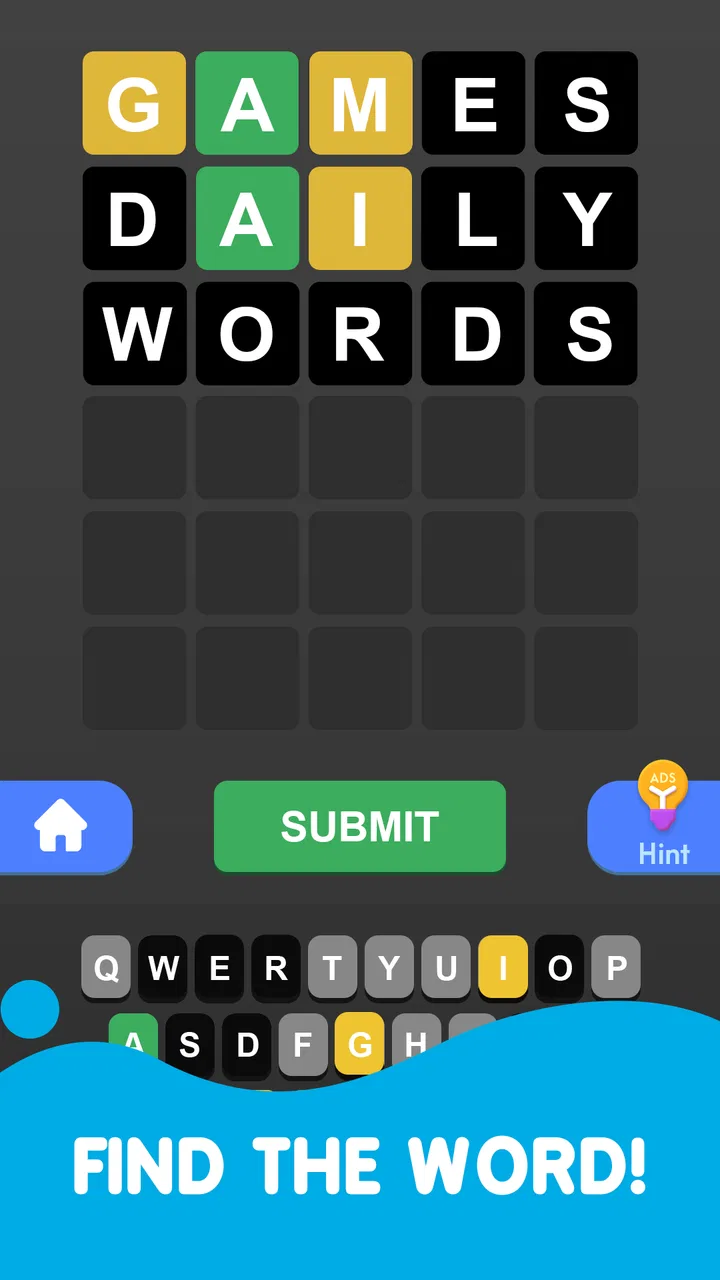
I approached Daily Word Challenge as a quick word game rather than a serious study tool, and that distinction matters. It is easy to understand: open it, look at the word puzzle, make a guess, and keep trying to improve your result. The appeal is strongest when I have a few spare minutes and want something more engaging than scrolling, but less demanding than a full game session.
It comes from Apollo Mobile Games and sits in the word-game category. The game is free to start, aimed at Everyone, and has built a sizable audience with over a million installs and an average rating of 4.5 from around seven thousand ratings. Those figures suggest that its simple format has found a receptive audience, although popularity alone does not guarantee that its rhythm will suit every player.
The store summary presents it as an alternative to Wordle, especially for people who dislike being restricted to one puzzle each day. That is the central idea I noticed in use: the experience is designed around word solving without making the daily limit the main event. If you enjoy testing another guess immediately after finishing one, that freedom is much more important than a decorative extra.
You May Also Like

 Blood Strike: 2.5 Anniversary
Blood Strike’s Loadouts Turn Every Drop Into a Tactical Gamble
A close look at Blood Strike’s custom loadouts: how fast access to signature weapons reshapes its battle royale rhythm, rewards preparation, and narrows the gap between fights.

 Pandora - Music & Podcasts
Pandora’s Music Is Easy to Start, but Harder to Recover
Pandora’s strength is its low-effort path from a seed to a station. Its weak spot is how much confidence it asks you to place in connection, setup, and quiet recovery.

 8 Ball Pool
 Is Built on Rivalries, Rematches, and Routine
A close look at the rivalries, rematches, shared routines, and unanswered safety questions that turn a quick pool match into a persistent mobile community.

 Samsung Music
’s Quiet Strength Is Playing What You Already Own
Its reach comes less from spectacle than from dependable access to a personal library. That simplicity is both the app’s strongest retention engine and its ceiling.

 AccuWeather: Weather Radar
AccuWeather Review: A Quick, Clear Forecast for Everyday Decisions
For everyday plans, the best forecast is the one you can understand quickly. AccuWeather makes rain timing, radar, and local conditions easy to act on, with a few trade-offs.

 Hill Climb Racing
Why Hill Climb Racing Still Turns Crashes Into One More Run
A tiny car, a bumpy hill and one more upgrade: Hill Climb Racing keeps resurfacing because its simple chaos makes every near-miss feel personal.
More From Our News Desk



Getting past the first points of friction
The first place a new player can get stuck is not necessarily the puzzle itself. It is the expectation of how the game should work. Someone arriving from a daily word game may assume that the app will offer one carefully paced challenge and then ask them to wait. Here, the unlimited approach changes the tempo. I found it better to treat each attempt as a short round, not as a single precious score that must define the entire day.
That change in mindset also helps with difficult words. When a guess does not work, I do not read it as a failed session. I use the information from the attempt, adjust my next word, and continue. The game becomes more enjoyable when I focus on narrowing possibilities rather than trying to protect a perfect run.
Players can also be caught out by the difference between knowing words and solving under pressure. A familiar word may still be a poor guess if it does not help separate likely letters from unlikely ones. My practical approach is to begin with a word I can spell confidently and that gives useful letter coverage, then use later guesses to test the most promising pattern. This makes the game feel less random and gives each attempt a purpose.
The most useful habit is to treat every guess as information, not merely as an answer attempt. That sounds obvious, but it changes how I respond to an awkward round. Instead of repeating a comfortable word, I deliberately choose a guess that checks a different group of letters. This is especially helpful when several possible answers look similar.
What to check before blaming the game
Because the game is free, it is tempting to open it casually and expect everything to be immediately obvious. I recommend taking a moment to read the visible instructions and inspect the current puzzle screen before entering a guess. Small misunderstandings about the accepted word format, the way feedback is displayed, or the action used to submit an answer can make a normal round feel broken.
It is also worth checking that the app has finished loading before tapping repeatedly. If the screen appears slow, repeated input can create uncertainty about whether a guess was registered. I prefer to pause, confirm that the board has updated, and only then continue. That simple habit prevents me from entering an extra guess because I assumed the previous tap had failed.
The technical baseline is broad: the current version is 2.3.0 and it supports Android 7.0 or later. That makes it accessible on many older Android devices, but compatibility is not the same as identical performance everywhere. A phone with limited free storage, an outdated system configuration, or aggressive background restrictions may behave differently from a newer device.
If the game does not open correctly, I would start with ordinary checks rather than assuming the puzzle service is at fault. I would close and reopen the app, verify that the device has a stable connection if loading requires one, and make sure the operating system meets the minimum requirement. I would also check for an available app update through the normal store interface. These steps are deliberately basic, but they resolve many first-launch and loading problems without changing anything important.
One useful setup check is to notice whether the problem happens every time or only during one session. A single delayed screen may be temporary. A repeatable failure after reopening points more strongly toward the device, the installation, or the current app version. Keeping that distinction in mind avoids wasting time changing settings that are unrelated to the actual problem.
Recovering a disrupted round
Unlimited play makes recovery less stressful than in a one-puzzle-per-day format. If a call, notification, accidental exit, or frozen screen interrupts me, I do not feel that the entire opportunity has been lost. I can reopen the game and see whether the current round remains available; if it does not, I can begin another challenge instead of waiting for tomorrow.
I would not repeatedly tap the answer area while the app is recovering. First I check whether the board reflects the last action. If the display is unchanged, I close the game normally and relaunch it. If the round returns, I continue from the visible state. If it starts fresh, I treat that as a new attempt and avoid entering the same sequence automatically, since I may not know which part of the previous interaction was recorded.
This is one of the quiet strengths of the format. The absence of a daily limit gives me room to experiment with strategy. I can try a more unusual opening word, compare a vowel-heavy approach with a consonant-heavy one, and learn from the result without feeling that I have spent the only puzzle available. For casual players, that lowers the emotional cost of making a mistake.
There is a trade-off, though. Unlimited access can encourage careless guessing. When another round is always available, I sometimes stop thinking carefully and start tapping through attempts. The best way around that is to set a small personal rule: before submitting, identify what the guess is testing. If it tests nothing new, I choose a better word or take a few seconds to reconsider the pattern.
A second practical technique is to separate solving from vocabulary checking. If I am unsure whether a possible answer is a real word, I first review the letters already ruled out and the positions that appear promising. Only then do I consider whether the candidate makes sense. This prevents me from chasing an attractive word that conflicts with the evidence already on the board.
When the app may not be the cause
Not every interruption is a game defect. A device running many apps at once can delay input or make a lightweight game appear unresponsive. Low available storage, temporary system slowdowns, or an unstable connection can also affect loading. My troubleshooting order is simple: wait briefly, confirm whether the screen changes, restart the app, and then test again before making more drastic changes.
If other apps are also slow, the issue is probably broader than this word game. In that situation, restarting the device and closing unnecessary background apps is more sensible than repeatedly reinstalling one title. If only this game behaves strangely, checking its version and reinstalling through the official app store may be reasonable, but I would use that as a later step because reinstalling can disrupt an in-progress session.
Keyboard behavior deserves attention too. If letters appear incorrectly, the problem may come from the device keyboard or touch input rather than the puzzle. I would test a few ordinary text fields elsewhere on the phone. If typing is unreliable everywhere, fixing the keyboard or device input is the better route. If typing works normally outside the game, then restarting the app becomes a more useful next check.
Players should also remember that a hard puzzle is not evidence of a technical failure. A word that feels obscure, a pattern with several plausible solutions, or a guess that receives unexpected feedback can all be part of normal play. I find it helpful to distinguish between a board that fails to respond and a board that responds with an answer I simply did not anticipate.
How it fits into a real day
My favorite use case is a short break when I want a clear stopping point. I might play while waiting for an appointment, during a coffee break, or after finishing a small task. One round can provide a little concentration without requiring the long commitment of a narrative game. If I finish quickly, I can stop. If I am enjoying the challenge, I can continue with another word.
That flexibility makes it more convenient than a strictly daily alternative for players who want repeated practice. It is also less structured. A daily game creates a routine and gives each puzzle a shared sense of importance. Daily Word Challenge is better for independent play, where I decide how long to continue and whether a difficult round deserves another attempt.
Compared with a traditional crossword, it asks for less time and less broad knowledge at once, but it offers less room for extended deduction. Compared with a large word-search game, it feels more focused because each guess has a direct relationship with the answer. Compared with vocabulary-learning apps, it is more recreational: I can sharpen pattern recognition and spelling awareness, but I would not use it as a replacement for a structured language course.
That comparison helps identify the right audience. I think it suits people who enjoy letter patterns, short challenges, and the satisfaction of improving a guess. It is particularly friendly to players who dislike waiting for a new daily puzzle. It is less suitable for someone looking for a campaign, character progression, rich visual variety, or a formal lesson plan.
Free access and the purchase decision
The game is free, which makes it easy to try without committing money at the start. In-app purchases are listed at $7.49 per item. I would approach those purchases carefully and first decide whether the basic loop itself is enjoyable. A paid add-on cannot fix a mismatch between the player and the core word-solving format.
For me, the strongest value comes from being able to return for another puzzle whenever I want. If that freedom is the feature I was looking for, the free entry point already provides a useful reason to keep the game installed. If I only enjoy a single carefully curated challenge each day, the unlimited design may feel less meaningful, regardless of optional purchases.
The Everyone age rating also matches the straightforward nature of the experience. I would still judge it by the needs of the person using it: younger players may benefit from playing alongside an adult if they are still building spelling confidence, while adults looking for advanced vocabulary training may find the format too light. The age label describes suitability broadly, not the depth of challenge for every skill level.
Who should install it, and who should skip it
I would recommend it to a friend who says, “I like Wordle-style puzzles, but I do not want to stop after one.” The unlimited structure is the clear reason to choose it. It also works for someone who wants a compact mental break, enjoys testing different opening strategies, and prefers a simple word game over a more complicated app.
I would suggest skipping it if the daily ritual is the main attraction. The pressure and anticipation of one shared puzzle may be more satisfying in a conventional daily format. I would also point elsewhere if you want detailed definitions, vocabulary lessons, timed competitive rankings, or a substantial progression system. This game’s appeal is its direct, repeatable word challenge, not a large collection of surrounding systems.
Another reason to look elsewhere is if repeated attempts make you play mechanically. Unlimited rounds are generous, but they can remove the natural stopping point that makes daily games feel special. I get more from it when I play with intention, take a short pause after a failed round, and return because I want to solve another puzzle rather than because I am tapping automatically.
My practical verdict
After using it as a compact word-game option, I see Daily Word Challenge as a focused alternative for players who want freedom from the usual daily limit. Its best quality is not complexity; it is the ability to keep solving when curiosity is still active. The format is easy to enter, works well in short breaks, and gives mistakes a lower cost because another attempt is available.
The limitations are equally clear. It does not replace a proper vocabulary course, a crossword collection, or a story-driven game. Its simplicity may feel repetitive to players who need visual variety or long-term progression, and unlimited access can weaken concentration if I stop treating guesses as deliberate choices.
My recommendation is to install it when you want a free, approachable word game that lets you play beyond one daily challenge. Before judging a difficult round, check that the screen has registered your input and that the device is behaving normally. Then use each guess to test something specific. With that approach, the game feels more thoughtful and less like random trial and error.
For a casual player, that balance is persuasive. Apollo Mobile Games has built a straightforward word experience with enough flexibility to fit around real life. I would keep it available for waiting rooms, short breaks, and those moments when I want a small puzzle without starting a much larger game. If unlimited word-solving is more important to you than daily ceremony, this is a sensible free choice.
FAQs for Daily Word Challenge
01What is the main objective of Daily Word Challenge?
Daily Word Challenge is designed to enhance your vocabulary and linguistic skills through engaging word puzzles and challenges. Each day offers a new set of words and puzzles, encouraging users to improve their language skills while having fun. The app is suitable for all age groups and adjusts its difficulty based on user performance.
02Is Daily Word Challenge free to use, or are there in-app purchases?
Daily Word Challenge is free to download and offers a range of features at no cost. However, it includes optional in-app purchases for users who wish to unlock advanced features, such as additional puzzle packs or ad-free experiences. These purchases are not necessary to enjoy the core features of the app.
03Does Daily Word Challenge require an internet connection to function?
While an internet connection enhances the experience by enabling daily updates and leaderboards, Daily Word Challenge can be played offline as well. The app stores a set of puzzles locally on your device, ensuring you can continue to play and improve your skills without an active connection.
04Can I track my progress and compete with friends?
Yes, Daily Word Challenge includes a progress tracking feature that allows you to monitor your improvement over time. Additionally, the app offers leaderboards where you can compare your scores with friends and other users globally, fostering a competitive environment that encourages consistent practice.
05Is Daily Word Challenge suitable for non-native English speakers?
Absolutely! Daily Word Challenge is designed to cater to both native and non-native English speakers. The app provides definitions and usage examples for each word, making it an excellent tool for language learners seeking to expand their vocabulary and understanding of English in an interactive manner.
Pros
- Engaging daily puzzles boost vocabulary.
- Offers hints to keep you progressing.
- User-friendly interface and design.
- Syncs progress across devices seamlessly.
- Regular updates with fresh content.
Cons
- Requires internet for some features.
- Ads can be intrusive at times.
- Limited customization options.
- Some puzzles are too challenging.
- Occasional app crashes reported.

Daily Word Challenge
Gallery